Motion

Standards

kwoo studio designed this motion identity system to define how our belö brand behaves and moves through the world.

Built on three core principles, it guides all motion behaviours, aligns with brand guidelines, and creates visual harmony between static & animated assets.

The result: greater creative efficiency and stronger brand messaging that’s consistent across every touchpoint.

Components

01 Strategy

Motion Systems must always start with strategy.

Strategy is the foundation of impactful motion.

This approach strengthens storytelling and supports the brand system.

Furniture brands have traditionally felt cold and stuffy.

To challenge industry norms, we built a more open, friendly and approachable brand for modern living.

Each movement reflects the experience of entering a warm and welcoming home.
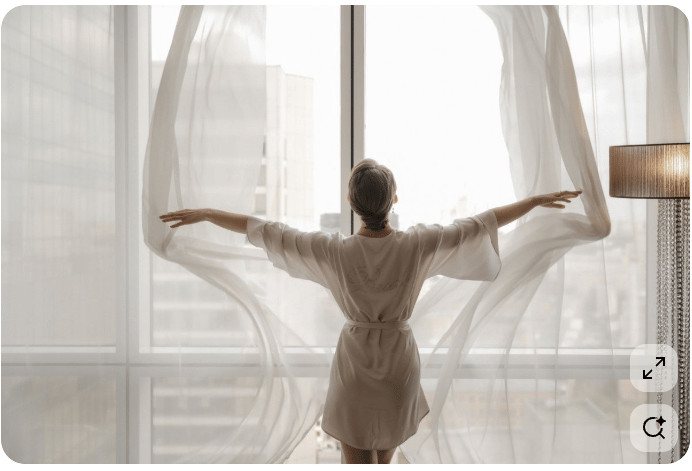
Woman opening curtains in flat

Our three motion principles unify movement across all touchpoints.

Creating a familiar experience that stregthens brand

Motion helps bring clarity and personality to our brand messaging.

When creating animations, movement should not be confusing or distracting.

Be intentional; focus only on moves that have purpose and move the story forward.

02 Motion

Principles/

Pillars

All motion behaviors are driven by our three creative principles.

Motion Behaviors

Motion Pillars

Alert

Boost engagement by driving viewers to react.

Tactile

Engage every sense, creating a visceral, emotional, and sensual response.

Open

We always appear warm and approachable.

These pillars describe how moves should look and feel. Each move must be intentional.

They convey a specific emotion, advance our brand’s story and bring clarity without confusion or distraction.

Above all, movement should evoke feelings that inspire action!

03 Assets

The system is not just one file.

It comprises of a versatile set of motion assets tailored to different use cases, software, and skill levels.

We placed an emphasis on maximum versatility, usability and compatibility when designing each resource.

This was done through a [3] layered approach:

(1) Editable Source Files (for other designers)

(2) Templates (for marketers & video editors)

(3) Ready-to-Use Exports (for social media managers/teams)

Inside the specifications portion of this document, you will find a simple usage guide which sets some best practices for moves.

Kinetic Wordmark

The core brand identifier that establishes our motion logic and influences all other elements in the system.

Reserved for intentional brand reveals.

Easing: Signature Motion Curve

Pacesetter Intro/Outro

most commonly used

Storyteller Intro/Outro

used sparingly

Kinetic Text

Standardises the entry and exit animations of typography. Ensures key information is quickly seen, understood, and then moves out of the way.

Delivers key info without disrupting flow of content.

Easing: Signature Motion Curve

Type Enters Left

animates ON

Type Exits Left

animates OFF

Kinetic Cards

Controlled, intentional sequences of moving images or video.

They are significantly more engaging than static visuals.

Used to add subtle movement to still images or to combine text, photos and videos into a single component.

Easing: Signature Motion Curve

Elements Scale

most commonly used

Elements Move

used sparingly

Transitions

Provide smooth, seamless shifts between content, building continuity and elevating the overall visual flow.

Controls the rhythm and pace of messaging through the use of branded cuts between content.

Easing: Signature Motion Curve

Transition

IN

Transition

OUT

Micro Animations

Guide viewers attention to key actions and points

of interest.

Usually done through iconography.

Another way to amplify brand personality.

Used to direct user experience while navigating our brand world.

Easing: Signature Motion Curve

Web Application

App Loader

Email Signature

Call to Action

Animated Gradients

used to convey specific emotions,

setting the tone for moods

& add dynamism to otherwise

flat backgrounds

Gradient 1 (confident/expressive)

Gradient 2 (careful)

Gradient 3 (soft)

Social Media Examples

16:9 Aspect Ratio (wide format)

9:16 (vertical format)

3:4 (portrait)
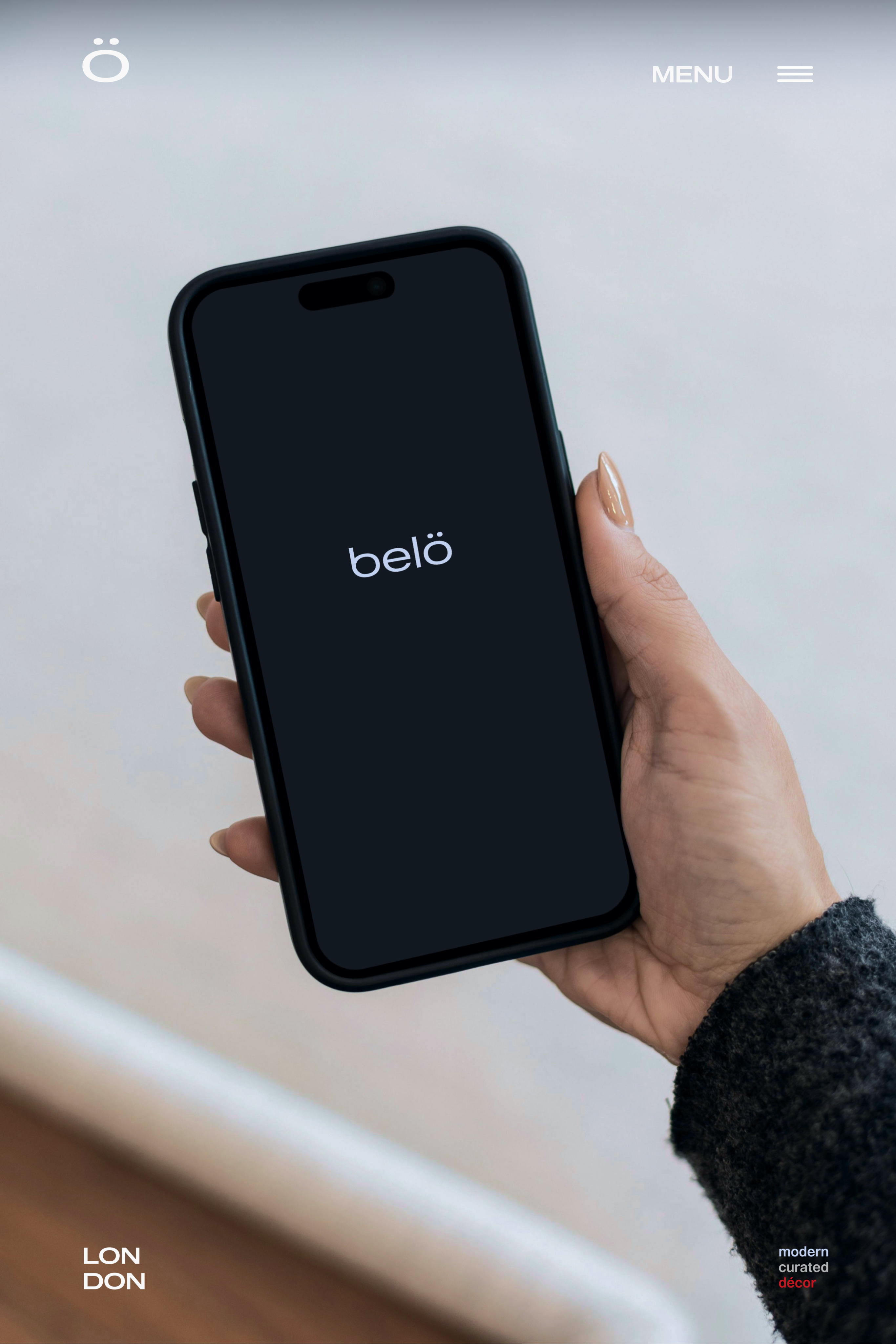
Phone mockup

Multi-format Applications

04 Specs

Motion logic defines how everything moves.

At its core is our Signature Motion Curve, the conductor of the system, paired with a precise timing scale (duration).

This repeatable curve synchronizes every motion asset, shaping a distinctive emotional feel.

When combined with timing, it creates intentional, cohesive movement that makes our brand instantly recognizable anywhere it shows up.

Complementary bézier curves, designated Easing Initials, provide variety while maintaining consistency.

Motion Formats

Duration

Pacesetter

Length: 0.4”

Used most frequently for social applications.

Storyteller

Length: 0.6-0.9”

Used for hero moments or narrative purposes.

Signature Motion Curve

This curve establishes the easing that will uniquely identify movement within

our brand.
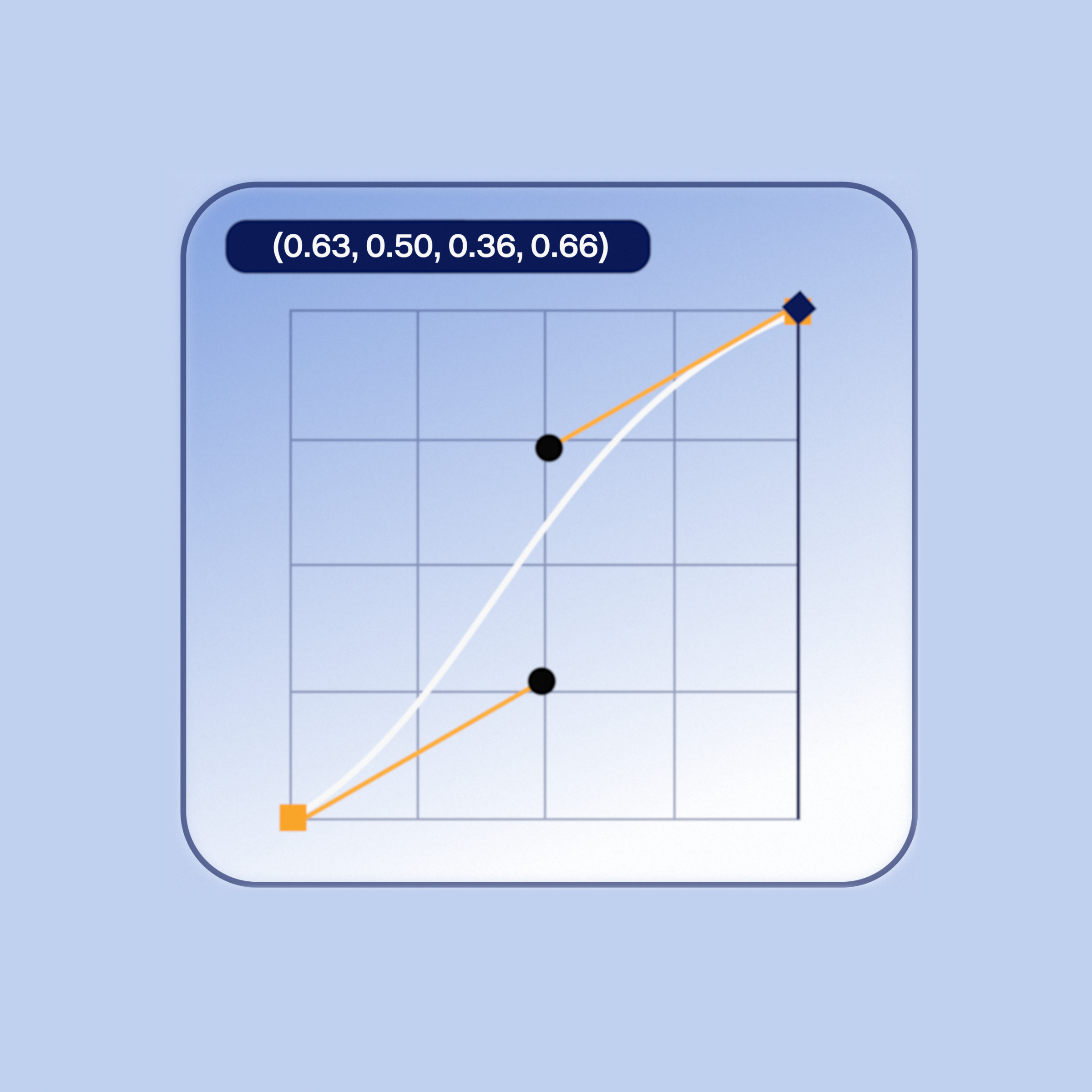
Image of secondary brand logo

Feels intentional and confident.

Motion is steady, maintains a consistent velocity and ends smoothly.

Easing Initials

(Complimentary Curves)

These easing curves add some variety to animations.

They reinforce and support the signature motion curve above.
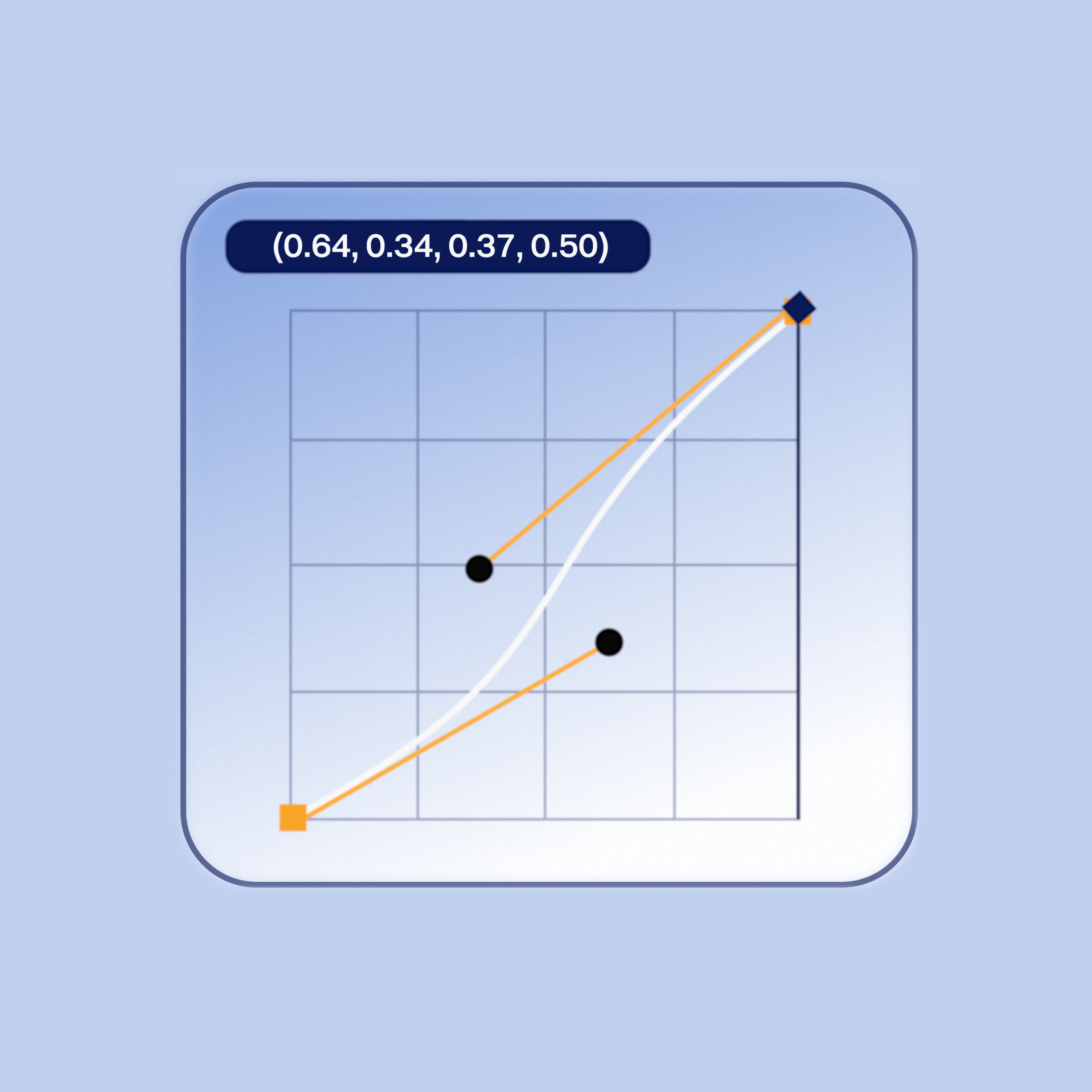
Image of secondary brand logo

Open

Feels careful and attentive.

Motion starts slow then ends gently.
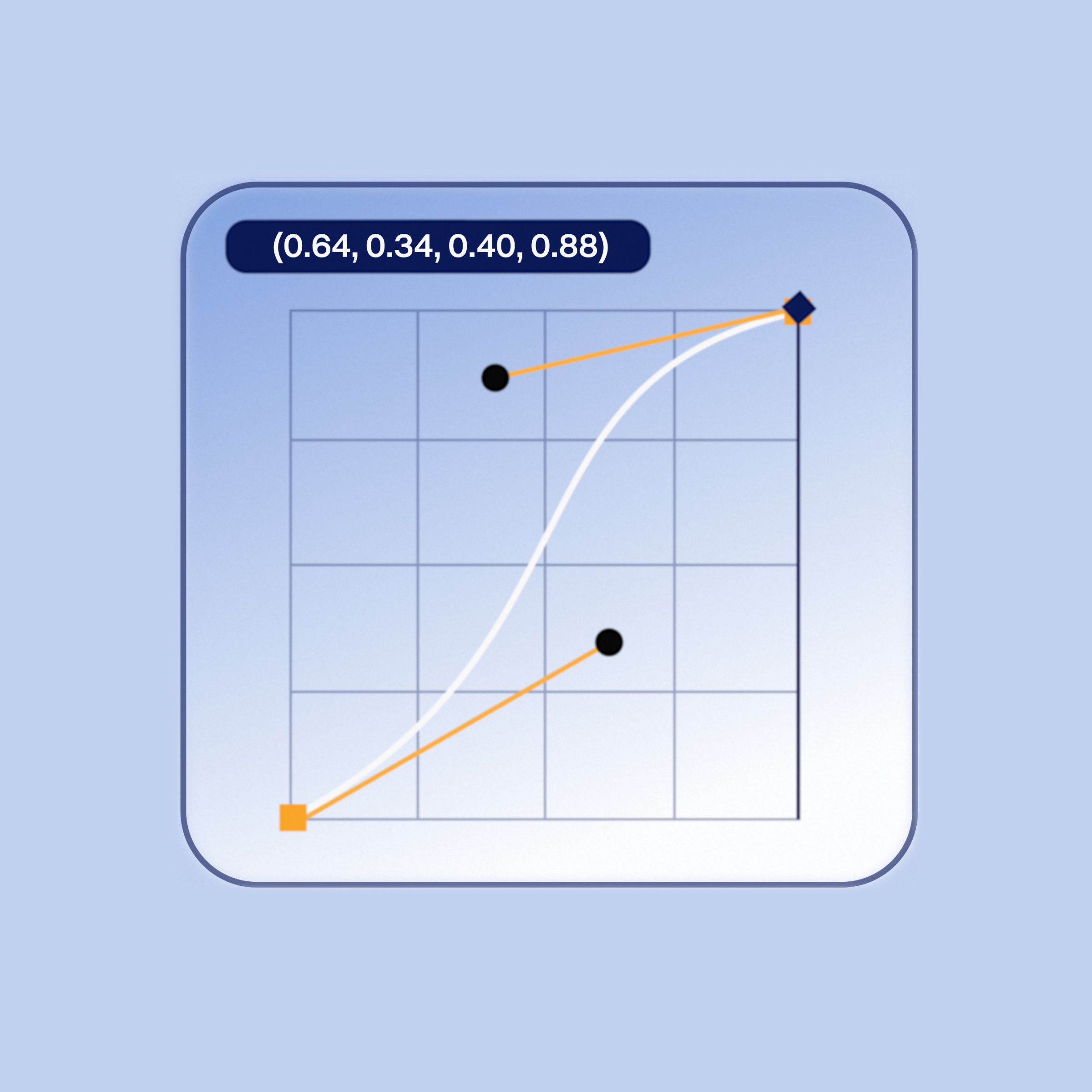
Image of secondary brand logo

Tactile

Feels soft and luxurious.

Motion starts slow then glides into place.
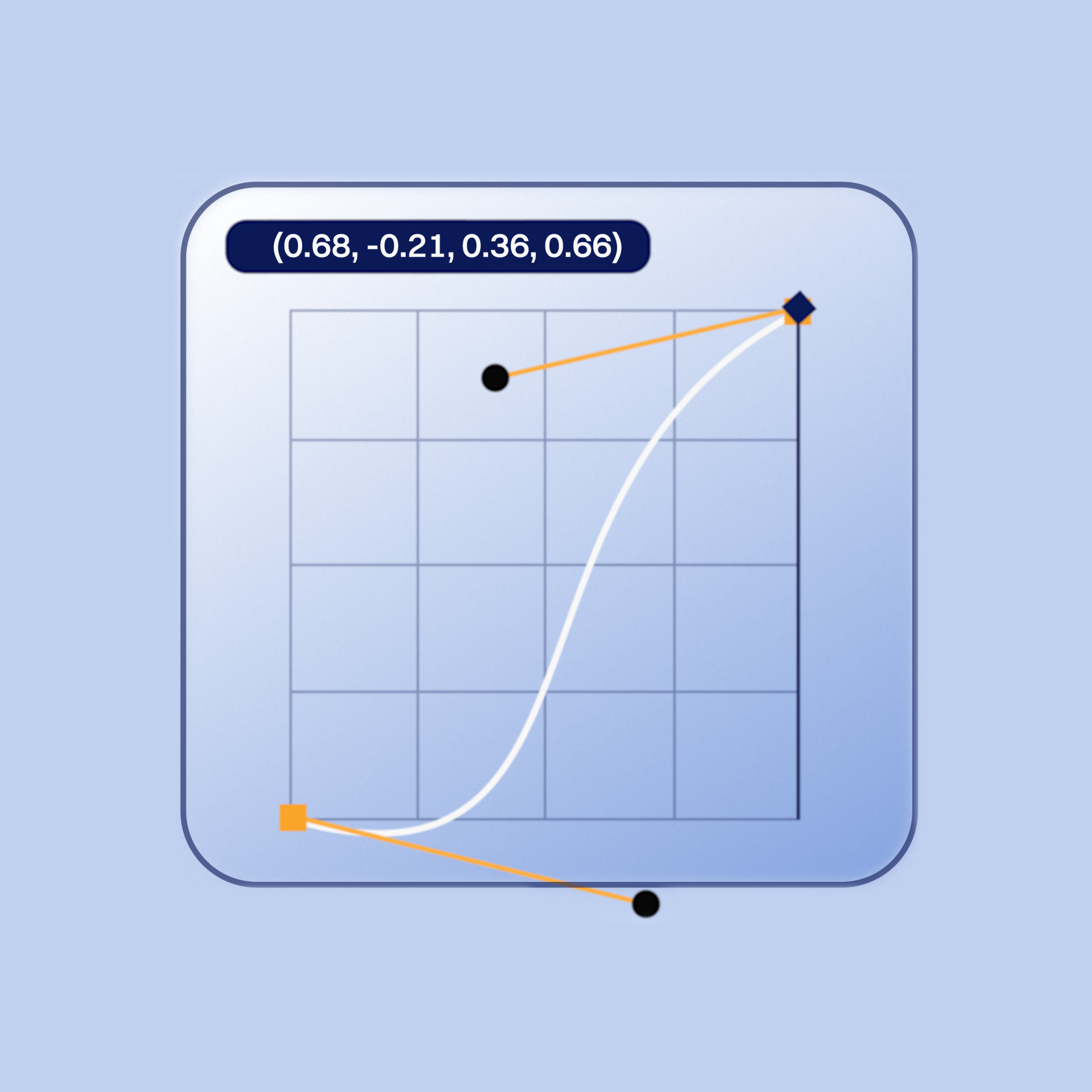
Image of secondary brand logo

Alert

Feels energetic and expressive.

Slight anticipation, moves fast with a controlled end.

05 Rules

Motion is an extension of the design system.

Always refer to the brand guidelines when creating

movement patterns (animations).
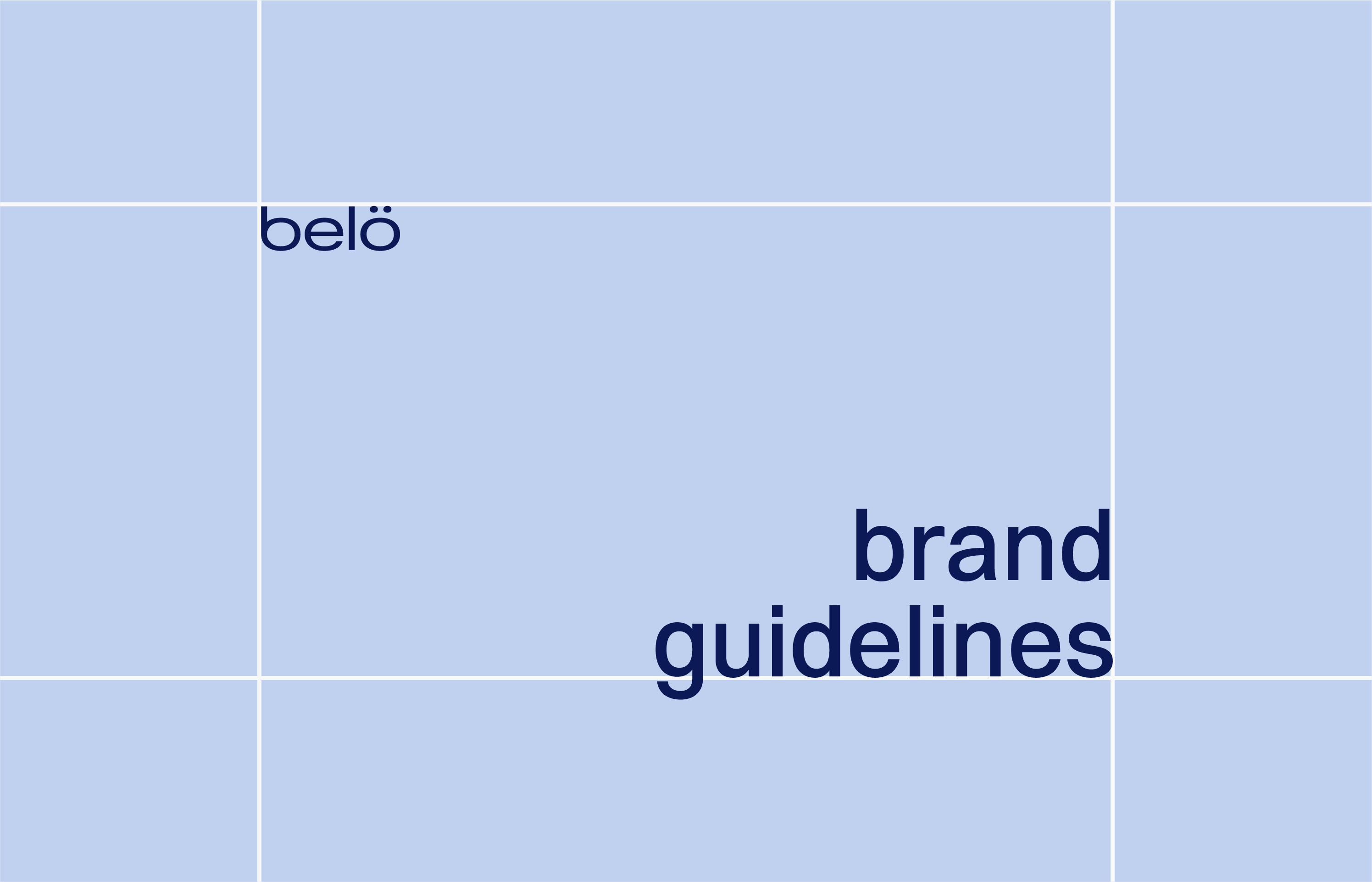
Brand Guidelines - usage rules

Only use the preset motion curves for moves.

Do not use a linear curve.

Timing scale sets the pacing for movement.

Do not create animations longer or shorter than presets.

Less is more; keep the motion focused.

Do not move many elements at the same time.

Motion Guidelines

Do not use incorrect or linear curves

Do not create long animations

Do not move elements simultaneously

Layout System

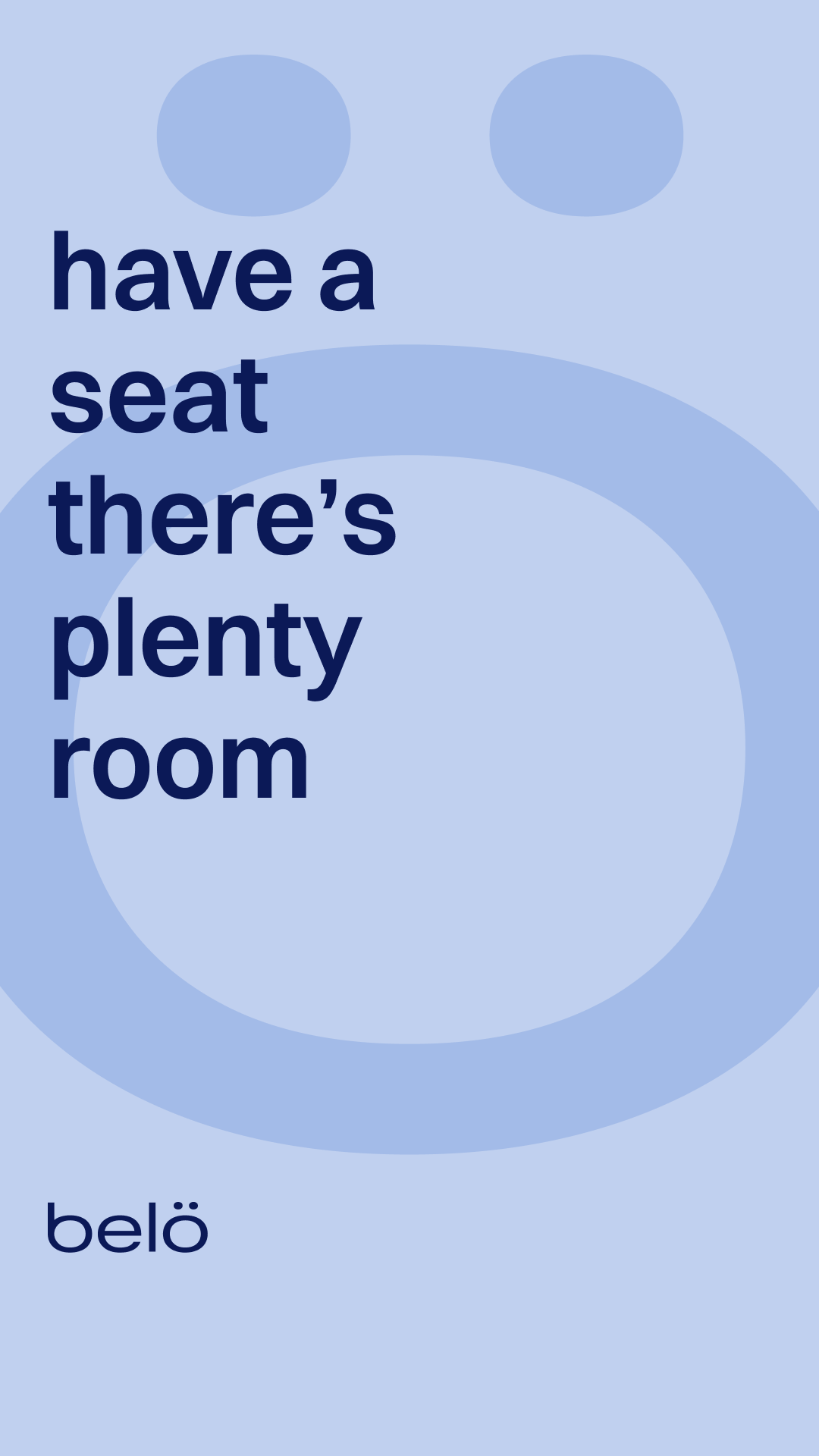
Adhere to these guides when setting text and visual elements within various sizing formats.

We use two standard grids for all compositions.

For vertical layouts (4x6) Grid, 64 margin, 32 gutter

For wide layouts (6x4) Grid, 64 margin, 32 gutter

  • Vertical Layouts

    Mainly used for compositions that have taller aspect ratios.

    Quickly organises information and acts as a guide for placement of visuals.

    View grid

  • 4 Columns 6 Rows (4x6)

    64 Margin

    32 Gutter

  • Horizontal Layouts

    Mainly used for compositions that have wider aspect ratios.

    Quickly organises information and acts as a guide for placement of visuals.

    View grid

  • 6 Columns 4 Rows (6x4)

    64 Margin

    32 Gutter
06 System

Here’s a look at our entire motion identity system in action!

The motion system is repeatable and scalable.

Which allows for greater flexibility and modularity as its implemented across various touchpoints.

Motion

Standards

kwoo studio designed this motion identity system to define how our belö brand behaves and moves through the world.

Built on three core principles, it guides all motion behaviours, aligns with brand guidelines, and creates visual harmony between static & animated assets.

The result: greater creative efficiency and stronger brand messaging that’s consistent across every touchpoint.

Components

01 Motion Brand Strategy

Motion Systems must always start with strategy.

Strategy is the foundation of impactful motion.

This approach strengthens storytelling and supports the brand system.

Furniture brands have traditionally felt cold and stuffy. To challenge industry norms, we built a more open, friendly and approachable brand for modern living.

Each movement reflects the experience of entering a warm and welcoming home.

Woman opening curtains in flat

Our three motion principles unify movement across all touchpoints.

Creating a familiar experience that stregthens brand

Motion helps bring clarity and personality to our brand messaging. When creating animations, movement should not be confusing or distracting. Be intentional; focus only on moves that have purpose and move the story forward.

02 Motion

Principles/

Pillars

All motion behaviours are driven by our three creative principles.These pillars describe how moves should look and feel. Each move must be intentional. They convey a specific emotion, advance our brand’s story and bring clarity without confusion or distraction.

Above all, movement should evoke feelings that inspire action!

Motion Behaviors

Motion Pillars

Alert

Boost engagement by driving viewers to react.

Tactile

Engage every sense, creating a visceral, emotional, and sensual response.

Open

We always appear warm and approachable.

03 Motion

Identity Assets

The system is not just one file.

It comprises of a versatile set of motion assets tailored to different use cases, software, and skill levels.

We placed an emphasis on maximum versatility, usability and compatibility when designing each resource.

This was done through a [3] layered approach:

(1) Editable Source Files (for other designers)

(2) Templates (for marketers & video editors)

(3) Ready-to-Use Exports (for social media managers/teams)

Inside the specifications portion of this document, you will find a simple usage guide which sets some best practices for movement.

Kinetic Wordmark

The core brand identifier that establishes our motion logic and influences all other elements in the system.

Reserved for intentional brand reveals.

Easing: Signature Motion Curve

Pacesetter Intro/Outro

most commonly used

Storyteller Intro/Outro

used sparingly

Kinetic Text

Standardises the entry and exit animations of typography. Ensures key information is quickly seen, understood, and then moves out of the way.

Delivers key info without disrupting flow of content.

Easing: Signature Motion Curve

Type Enters Left

animates ON

Type Exits Left

animates OFF

Kinetic Cards

Controlled, intentional sequences of moving images or video. They are significantly more engaging than static visuals.

Used to add subtle movement to still images or to combine text, photos and videos into a single component.

Easing: Signature Motion Curve

Elements Scale

most commonly used

Elements Move

used sparingly

Transitions

Provide smooth, seamless shifts between content, building continuity and elevating the overall visual flow.

Controls the rhythm and pace of messaging through the use of branded cuts between content.

Easing: Signature Motion Curve

Transition - IN

Transition - OUT

Micro Animations

Guide viewers attention to key actions and points of interest.

Usually done through iconography.

Another way to amplify brand personality.

Used to direct user experience while navigating our brand world.

Easing: Signature Motion Curve

Web Application

App Loader

Email Signature

Call to Action

Animated Gradients

used to convey specific emotions, setting the tone for moods

& add dynamism to otherwise flat backgrounds

Gradient 1 (confident/expressive)

Gradient 2 (careful)

Gradient 3 (soft)

Social Media Examples

16:9 Aspect Ratio (wide format)

9:16 (vertical format)

3:4 (portrait)

Phone mockup

Multi-format Applications

04 Timing &

Easing (Specs)

Motion logic defines how everything moves.

At its core is our Signature Motion Curve, the conductor of the system, paired with a precise timing scale (duration).

This repeatable curve synchronizes every motion asset, shaping a distinctive emotional feel.

When combined with timing, it creates intentional, cohesive movement that makes our brand instantly recognizable anywhere it shows up.

Complementary bézier curves, designated Easing Initials, provide variety while maintaining consistency.

Motion Formats

Duration

Pacesetter

Length: 0.4”

Used most frequently for social applications.

Storyteller

Length: 0.6-0.9”

Used for hero moments or narrative purposes.

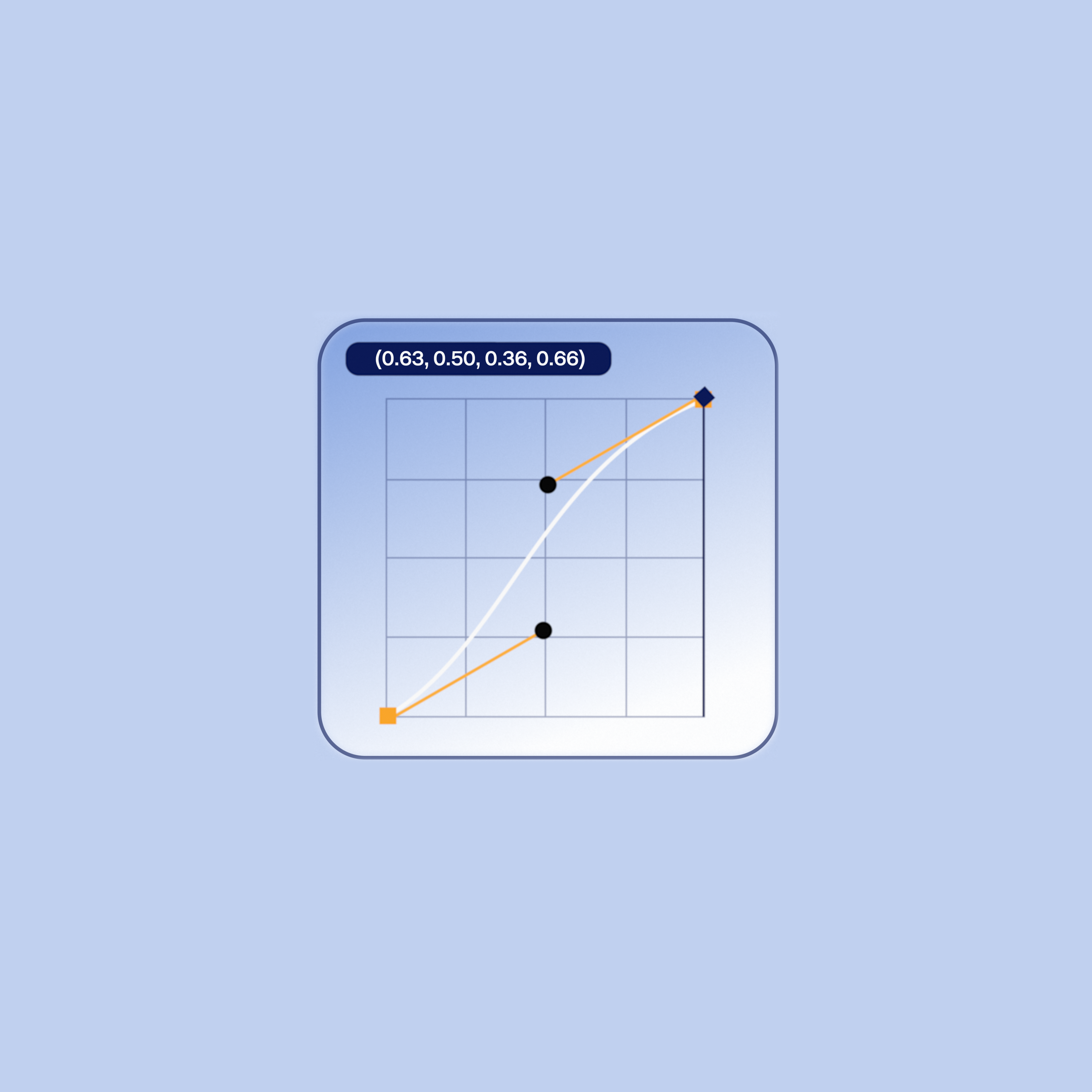
Signature Motion Curve (Cubic Bézier)

This curve establishes the easing that will uniquely identify movement within our brand.

Signature motion curve

Feels intentional and confident.

Motion is steady, maintains a consistent velocity and ends smoothly.

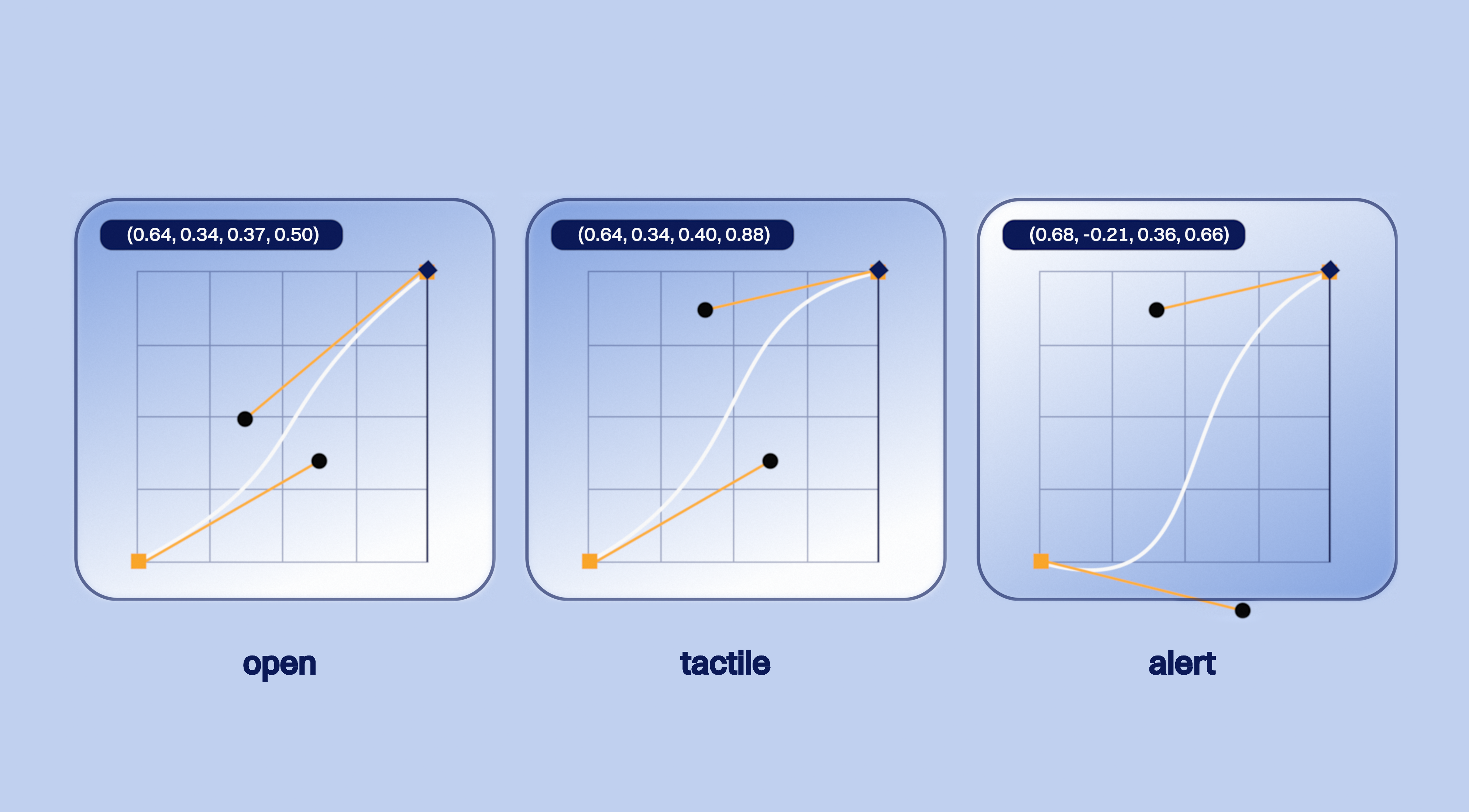
Easing Initials (Complimentary Curves)

These easing curves add some variety to animations.

They reinforce and support the signature motion curve above.

Easing initals curves

Feels careful and attentive.

Motion starts slow then ends gently.

Feels soft and luxurious.

Motion starts slow then glides into place.

Feels energetic and expressive.

Slight anticipation, moves fast

with a controlled end.

05 Usage Rules

Motion is an extension of the design system.

Always refer to the brand guidelines when creating

movement patterns (animations).

Brand Guidelines - usage rules

Only use the preset motion curves for moves.

Do not use a linear curve.

Timing scale sets the pacing for movement.

Do not create animations longer or shorter than presets.

Less is more; keep the motion focused.

Do not move many elements at the same time.

Motion Guidelines

Do not use incorrect or linear curves

Do not create long animations

Do not move elements simultaneously

Layout System

Adhere to these guides when setting text and visual elements within various sizing formats.

We use two standard grids for all compositions.

For vertical layouts (4x6) Grid, 64 margin, 32 gutter

For wide layouts (6x4) Grid, 64 margin, 32 gutter

  • Vertical Layouts

    Mainly used for compositions that have taller aspect ratios.

    Quickly organises information and acts as a guide for placement of visuals.

    View grid

  • 4 Columns 6 Rows (4x6)

    64 Margin

    32 Gutter

  • Horizontal Layouts

    Mainly used for compositions that have wider aspect ratios.

    Quickly organises information and acts as a guide for placement of visuals.

    View grid

  • 6 Columns 4 Rows (6x4)

    64 Margin

    32 Gutter
06 System

in Action

Here’s a look at our full motion identity system

in action!

The motion system is repeatable and scalable.

Which allows for greater flexibility and modularity as its implemented across various touchpoints.
Contact

©kwoo studio 2026 Kent Wood — Motion Brand Strategist

Motion

Standards

kwoo studio designed this motion identity system to define how our belö brand behaves and moves through the world.

Built on three core principles, it guides all motion behaviours, aligns with brand guidelines, and creates visual harmony between static & animated assets.

The result: greater creative efficiency and stronger brand messaging that’s consistent across every touchpoint.

Components

01 Motion Brand Strategy

Motion Systems must always start with strategy.

Strategy is the foundation of impactful motion.

This approach strengthens storytelling and supports the brand system.

Furniture brands have traditionally felt cold and stuffy.

To challenge industry norms, we built a more open, friendly and approachable brand for modern living.

Each movement reflects the experience of entering a warm and welcoming home.

Woman opening curtains in flat

Our three motion principles unify movement across all touchpoints.

Creating a familiar experience that ensures consistency, strengthens brand recall and boosts engagement.

Motion adds clarity and personality to our brand.

Keep animations intentional; only use movement that serves a purpose and advances the story.

02 Motion

Principles/

Pillars

All motion behaviours are driven by our three creative principles.These pillars describe how moves should look and feel. Each move must be intentional. They convey a specific emotion, advance our brand’s story and bring clarity without confusion or distraction.

Above all, movement should evoke feelings that inspire action!

Motion Behaviors

Motion Pillars

Alert

Boost engagement by driving viewers to react.

Tactile

Engage every sense, creating a visceral, emotional, and sensual response.

Open

We always appear warm and approachable.

03 Motion

Identity Assets

The system is not just one file.

It comprises of a versatile set of motion assets tailored to different use cases, software, and skill levels.

We placed an emphasis on maximum versatility, usability and compatibility when designing each resource.

This was done through a [3] layered approach:

(1) Editable Source Files (for other designers)

(2) Templates (for marketers & video editors)

(3) Ready-to-Use Exports (for social media

managers/teams)

Inside the specifications portion of this document,

you will find a simple usage guide which sets some

best practices for movement.

Kinetic Wordmark

The core brand identifier that establishes our motion logic and influences all other elements in the system.

Reserved for intentional brand reveals.

Easing: Signature Motion Curve

Pacesetter Intro/Outro

most commonly used

Storyteller Intro/Outro

used sparingly

Kinetic Text

Standardises the entry and exit animations of typography. Ensures key information is quickly seen, understood, and then moves out of the way.

Delivers key info without disrupting flow of content.

Powered by, Signature Motion Curve

Type Enters Left

Type Exits Left

Kinetic Cards

Controlled, intentional sequences of moving images or video. They are significantly more engaging than static visuals.

Used to add subtle movement to still images or to combine text, photos and videos into a single component.

Powered by, Signature Motion Curve

Elements Scale

Elements Move

Transitions

Provide smooth, seamless shifts between content, building continuity and elevating the overall visual flow.

Controls the rhythm and pace of messaging through the use of branded cuts between content.

Powered by, Signature Motion Curve

Transition - IN

Transition - OUT

Micro Animations

Guide viewers attention to key actions and points

of interest. Usually done through iconography.

Another way to amplify brand personality.

Used to direct user experience while navigating our brand world.

Powered by, Easing Initials Bézier

Web Application

App Loader

Email Signature

Call to Action

Animated Gradients

used to convey specific emotions, setting the tone for moods

& add dynamism to otherwise flat backgrounds

Gradient 1 (confident/expressive)

Gradient 2 (careful)

Gradient 3 (soft)

Social Media Examples

16:9 Aspect Ratio (wide format)

9:16 (vertical format)

3:4 (portrait)

Phone mockup

Multi-format Applications

04 Timing &

Easing (Specs)

Motion logic defines how everything moves.

At its core is our Signature Motion Curve, the conductor of the system, paired with a precise timing scale (duration).

This repeatable curve synchronizes every motion asset, shaping a distinctive emotional feel.

When combined with timing, it creates intentional, cohesive movement that makes our brand instantly recognizable anywhere it shows up.

Complementary bézier curves, designated Easing Initials, provide variety while maintaining consistency.

Motion Formats

Duration

Pacesetter

Length: 0.4”

Used most frequently for social applications.

Storyteller

Length: 0.6-0.9”

Used for hero moments or narrative purposes.

Signature Motion Curve (Cubic Bézier)

This curve establishes the easing that will uniquely identify movement within our brand.

Signature motion curve

Feels intentional and confident.

Motion is steady, maintains a consistent velocity and ends smoothly.

Easing Initials (Complimentary Curves)

These easing curves add some variety to animations.

They reinforce and support the signature motion curve above.

Easing initals curves

Feels careful and attentive.

Motion starts slow then ends gently.

Feels soft and luxurious.

Motion starts slow then glides into place.

Feels energetic and expressive.

Slight anticipation, moves fast with a controlled end.

05 Usage Rules

Motion is an extension of the design system.

Always refer to the brand guidelines when creating

movement patterns (animations).

Brand Guidelines - usage rules

Only use the preset motion curves for moves.

Do not use a linear curve.

Timing scale sets the pacing for movement.

Do not create animations longer or shorter than presets.

Less is more; keep the motion focused.

Do not move many elements at the same time.

Motion Guidelines

Do not use incorrect or linear curves

Do not create long animations

Do not move elements simultaneously

Layout System

Adhere to these guides when setting text and visual elements within various sizing formats.

We use two standard grids for all compositions.

For vertical layouts (4x6) Grid, 64 margin, 32 gutter

For wide layouts (6x4) Grid, 64 margin, 32 gutter

  • Vertical Layouts

    Mainly used for compositions that have taller aspect ratios.

    Quickly organises information and acts as a guide for placement of visuals.

    View grid

  • 4 Columns 6 Rows (4x6)

    64 Margin

    32 Gutter

  • Horizontal Layouts

    Mainly used for compositions that have wider aspect ratios.

    Quickly organises information and acts as a guide for placement of visuals.

    View grid

  • 6 Columns 4 Rows (6x4)

    64 Margin

    32 Gutter

06 System

in Action

Here’s a look at our full motion identity system

in action!

The motion system is repeatable and scalable.

Which allows for greater flexibility and modularity as its implemented across various touchpoints.